.png)



Introduction
Hiring teams move fast, and the biggest cost is not a bad hire. It is the time lost to uncertainty. Not knowing where a candidate stands. Not seeing which agents are falling behind. Not having the context to decide quickly. This release tackles that across every layer of the workflow. Every update here puts real information in front of your team at exactly the moment they need it, and gives recruiters the direct controls to act on it cleanly.
Interview Reports Got Better
What changed and why it matters
The old interview summaries captured highlights but lost depth. A senior engineer interview might cover system design, past failures, leadership style, and debugging philosophy all in sixty minutes. Compress that into a few bullet points and you lose the nuance that actually distinguishes a great candidate from a good one.
Reports now use a knowledge graph approach to map what was discussed, how fully each concept was explored, and what answers revealed about the candidate beyond the surface. Every question, every follow-up, every tangent is accounted for.
The result is a summary that reads like a thoughtful analyst wrote it. Context is preserved across lengthy conversations so the recruiter reviewing the report feels like they were in the room. You no longer need to replay recordings or re-read full transcripts to feel confident before advancing a candidate.
Where this saves you the most time
This update is most impactful for roles where interview quality is the differentiator. Senior individual contributors, leadership positions, or specialist technical roles. When you are comparing two strong candidates, the depth of the report is what helps you make the right call without scheduling another round.
Full conversation coverage
Every topic, follow-up, and tangent captured with nothing compressed away.
Concept-level evaluation
See how deeply each skill area was probed and what the answers revealed.
Faster candidate comparison
Side-by-side context means fewer additional calls to break ties.
Works across all interview types
Consistent quality whether it is a 20-minute prescreen or a 90-minute panel.
Real-Time Agent Analytics
The problem this solves
Hiring pipelines fail quietly. A role stays open longer than expected. The team assumes the agents are working. Two weeks later someone opens the workflow and finds a backlog nobody noticed. By then, the best candidates have moved on.
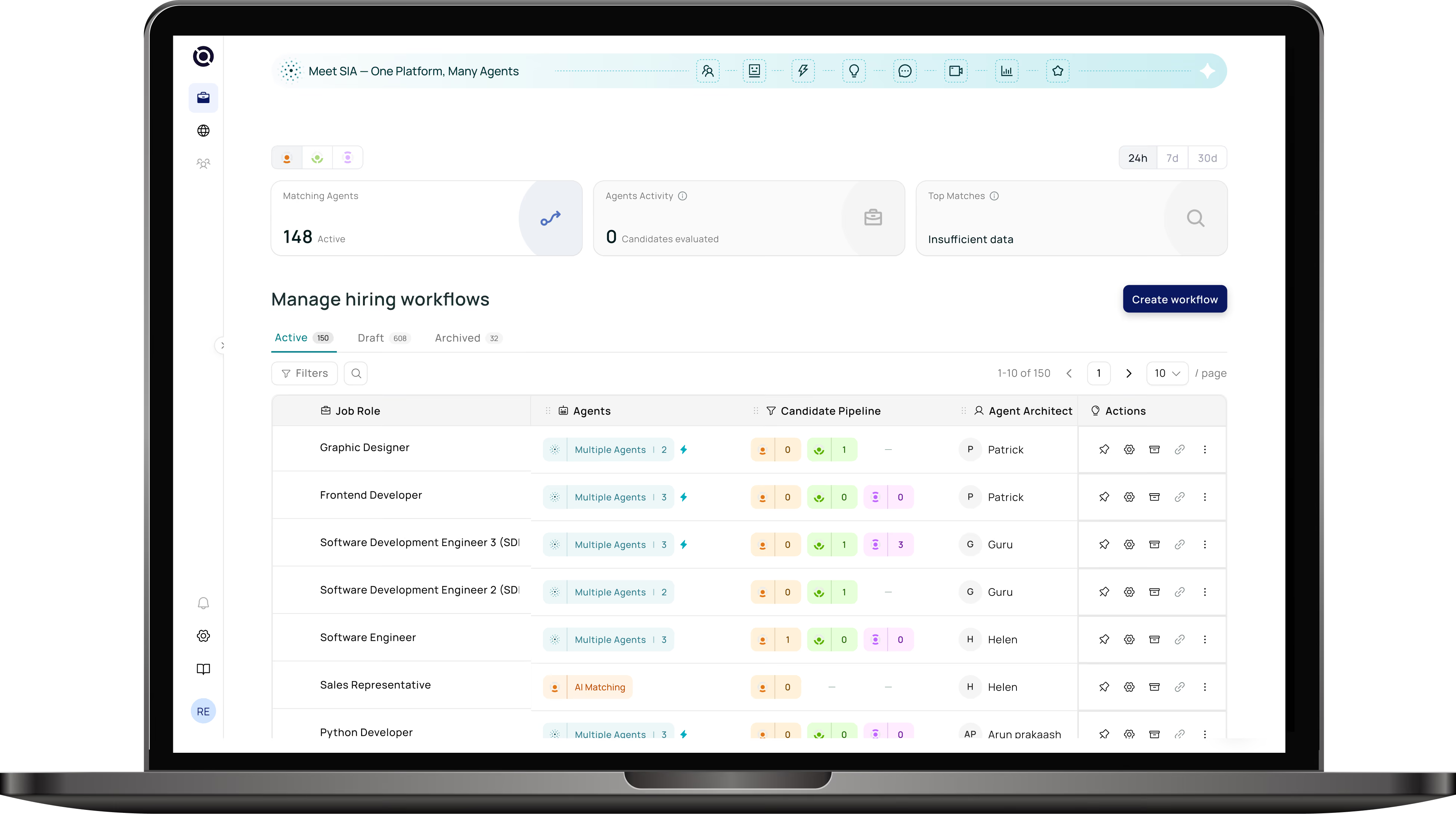
Real-time agent analytics gives you the operational layer that was missing. You can now see how many agents are active, how many candidates have been evaluated, and where drop-offs are happening all from the workflow dashboard without clicking into individual roles.
What you can monitor
The dashboard breaks down activity across all three agent stages. Resume Matching shows intake volume and throughput. Prescreening surfaces engagement rates and how many candidates are progressing. Interview Intelligence tracks completion rates and time per stage. When one stage is slower than expected, you see it immediately and can act before it affects your timeline.
Live throughput per agent stage
Matching, Prescreening, and Interviews tracked in real time from one dashboard.
Bottleneck detection
Stage drop-offs surface automatically so nothing slips through unnoticed.
Engagement rate visibility
See how candidates are responding to outreach at every stage.
Time-on-stage tracking
Know when a stage is running long before it affects your hiring timeline.
Transparent Candidate Pipeline
Why the workflow table needed this
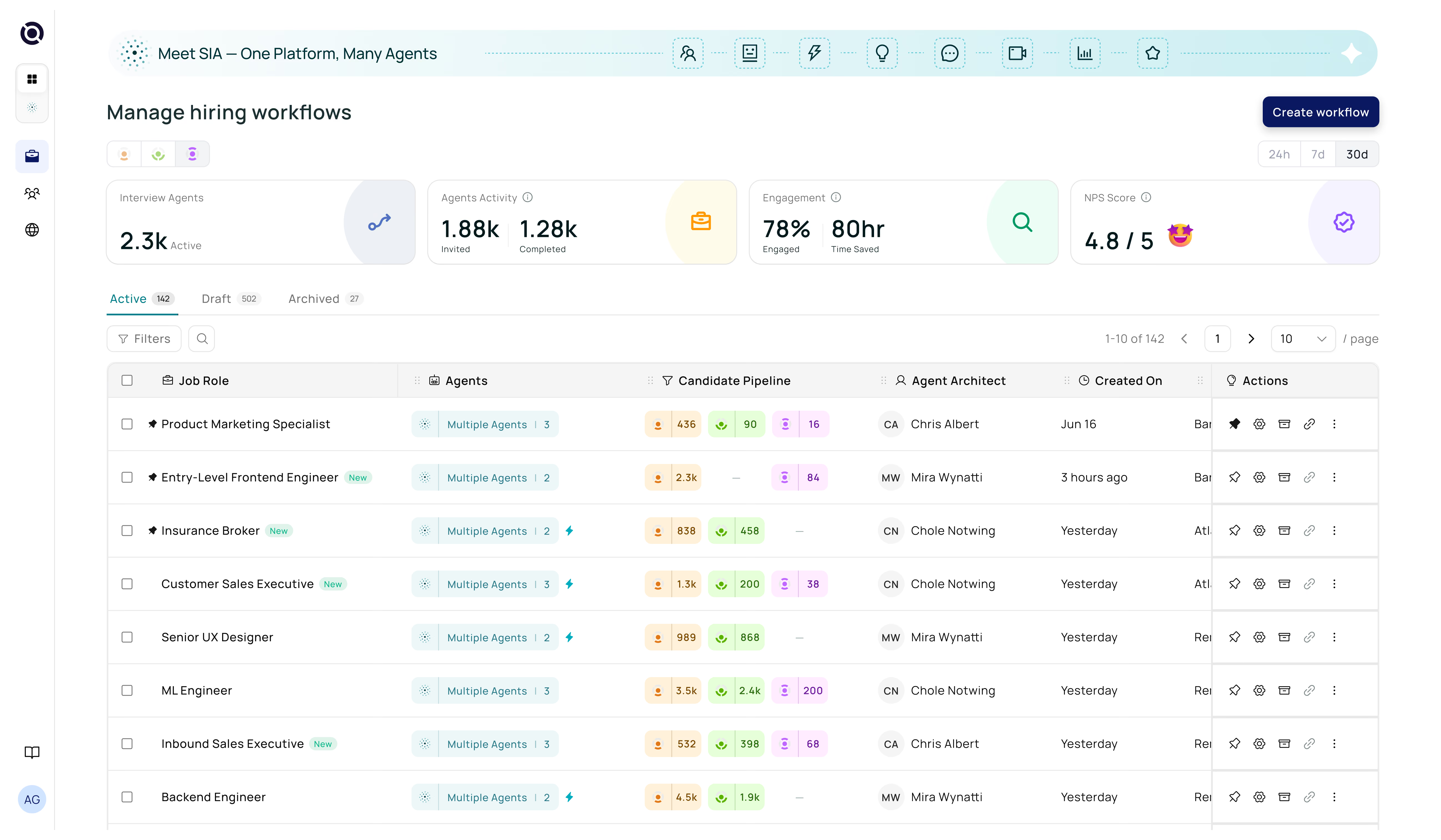
The workflow table used to tell you a role existed and when it was last updated. That was it. To understand what was actually happening you had to open each workflow individually. For a team running ten, twenty, or fifty concurrent workflows, that is not a review process. That is a full-time job.
The new pipeline columns change that completely. Each row now shows a live count of candidates screened by each agent and how many agents are currently active on that role. Your Friday pipeline review now takes minutes instead of an hour. Scan the table, spot the roles where agent activity is low or screened counts are behind, and prioritise your attention accordingly.
Screened count per agent
See total candidates processed per agent directly from the workflow row.
Active agent count
Know at a glance how many agents are engaged on each role right now.
Faster pipeline reviews
Scan across all workflows in minutes rather than opening each one.
Spot thin pipelines early
Identify roles at risk before the shortage affects your hiring timeline.
Filter Workflows by Team Member
When this matters most
Hiring teams are rarely solo operations. Recruiters own different roles, managers track specific pipelines, and HR partners need to audit what is active at any given time. Before this update, the only way to find a specific person’s workflows was to know their naming convention or ask them directly.
The new team filter changes that. A single dropdown lets you surface all workflows created by any member of your team. Select a name and the table instantly filters to show only their work.
Three ways teams are using this
The most common use case is manager review. Filtering to a recruiter’s name before a one-on-one or pipeline review meeting. The second is cover during leave. When a recruiter is out, their manager can instantly pull up their workflows and monitor or hand them off. The third is accountability tracking. Making sure work is distributed evenly and no one person is holding too many open roles at once.
One-click team filtering
Surface any teammate’s workflows instantly from the main workflow table.
Manager review made easy
Pull up a recruiter’s full workload before pipeline reviews or one-on-ones.
Seamless cover during leave
Monitor a colleague’s roles without needing their login or handover notes.
Even workload distribution
Spot when one recruiter is carrying too many active roles before it becomes a problem.
Disqualified Stage with Recruiter Control
The pipeline clarity problem
Without a proper disqualification stage, candidates accumulate. They sit in Matching or Prescreening long past their useful life. Recruiters know they are not going forward but have nowhere clean to put them. The active pipeline gets cluttered, counts become misleading, and reports show numbers that do not reflect reality.
The new Disqualified stage fixes this at the source. A single action moves a candidate out of active consideration and into a clearly labelled, separate stage. They are not deleted. They remain visible for auditing, compliance, and rejection reason analysis. But they no longer pollute the pipeline you are actively working.
What recruiter control actually means
No candidate moves to Disqualified automatically. Every disqualification is a deliberate action by a recruiter. This ensures no candidate is removed by an agent making an incorrect call, and creates an audit trail where every removal is tied to a person and a timestamp. That becomes important in regulated industries or any context where hiring decisions need to be defensible.
One-click disqualification
Move candidates out of active view with a single, intentional action.
Pipeline stays clean and accurate
Active counts reflect only real candidates, making reporting trustworthy.
Full audit trail preserved
Every removal logged with who did it and when, defensible and compliant.
No automated removals
Agents never disqualify candidates; every decision belongs to a recruiter.
Edit Contact Details in Resume Matching
A small friction point with outsized impact
Wrong contact details are more common than they should be. A candidate applies with an old email. A phone number has a typo. A contact was imported from an ATS with a formatting error. None of these are big problems in isolation, but every one creates a speed bump that pulls a recruiter out of their flow.
The old process meant navigating to the candidate profile, finding the contact section, making the edit, saving, and navigating back to Resume Matching. Four steps, two screen changes, thirty seconds minimum. Multiply that across a high-volume sourcing sprint and it adds up to a significant amount of lost time.
How the inline editor works
Clicking the edit icon on any candidate in Resume Matching opens a small inline panel directly in the table. Email and phone number can both be updated without leaving the view. Save and the panel closes. The recruiter is exactly where they were, with correct contact information, ready to proceed. No navigation, no page reload, no risk of losing your place in a long candidate list.
Inline editing, zero navigation
Update email and phone directly in the Resume Matching table.
No page reload or context loss
The panel opens and closes without disrupting your place in the list.
Accurate outreach, every time
Fix errors before progressing a candidate, not after a bounce.
Works across all candidate sources
Corrects details regardless of where the candidate was originally imported from.